A PDF is the simplest digital product there is: one file that opens on any phone or laptop. Most of the work of selling one is choosing the shop around it, because the shop decides who finds the file, what each sale costs you and what happens to the file after someone pays.
There are three kinds: a marketplace like Etsy, a hosted store like Gumroad, and a checkout on your own page.
Get the file ready#
- Keep it small. Compress the images when you export. Etsy caps files at 20 MB, and wherever you sell, a smaller file opens faster on a phone.
- Put your name and page address in the footer. A PDF can be forwarded, and the footer goes with it.
- Name the file for the buyer. On Stick the download keeps the name of the file you uploaded, so
Budget planner 2027.pdfbeatsfinal_v3_export.pdf. - Make a cover image for the product card. A mockup of a few inside pages shows what someone is buying better than the title page does.
Three ways to sell a PDF#
On Etsy#
Etsy brings its own shoppers, which is what its fees pay for. A seller based in the US pays a $0.20 listing fee, a 6.5% transaction fee and 3% + $0.25 in payment processing on each sale (Etsy fees, payment processing), plus 15% when one of Etsy's Offsite Ads brought the buyer (12% for shops past $10,000 in sales over the past year). A digital listing holds up to five files of up to 20 MB each, and Etsy hands them to the buyer after payment (Etsy digital listings).
On a store like Gumroad#
Gumroad takes 10% + $0.50 of each sale made through your profile or a direct link, plus card processing of 2.9% + $0.30, or a flat 30% when its Discover marketplace made the sale (Gumroad fees). It is the merchant of record and handles sales tax and VAT for you (Gumroad pricing).
On your own page#
A checkout on your own page costs card processing and no platform cut, and every buyer's email address is yours. In exchange you find every buyer yourself, and as the seller of record you deal with tax. Stan Store works this way for a monthly subscription; our Stan Store explainer has its prices and Stick vs Stan Store compares the two. On Stick it is a Digital Product block, set up below.
Here is what a $10 PDF leaves you, for a US seller and a US card, before tax:
| Where it sells | Fees on $10 | You keep | Who finds the buyer |
|---|---|---|---|
| Etsy | $1.40, or $2.90 when an Offsite Ad made the sale | $8.60 | Etsy search, or you |
| Gumroad, through your link | $2.09 | $7.91 | You |
| Your own page, Stripe checkout | $0.59 | $9.41 | You |
Etsy's and Gumroad's fees were checked against their own pages on 28 October 2026. The Stripe row uses Stripe's standard US rate for domestic cards, 2.9% + $0.30, and the Stripe fee calculator works out any other price.
Price it above the fixed fees#
Each sale pays a fixed amount on top of the percentage: $0.45 on Etsy, $0.80 on Gumroad, $0.30 through Stripe. That barely registers at $10 and hurts at $3, where the fees come to $0.74 on Etsy, $1.19 on Gumroad and $0.39 through Stripe. If your PDFs are small, sell them as a set: one $12 bundle of four planners pays the fixed part once instead of four times.
Sell a PDF from your Stick page#
- In the editor, add a Digital Product block. It's under Grow & Earn in the block menu.
- Upload the cover, then write a title and a description that says what's inside and how many pages it has.
- Under Price, choose Paid and enter the amount. An optional Sale price is charged whenever it's lower, with the original shown crossed out.
- Under Reward after submit, choose File and upload the PDF. A file can be up to 5 GB.
- Connect Stripe once, in Settings → Payments. Prices show and charge in your Stripe account's currency, and a paid product won't publish until that account can take payments.
- Publish, and put the page in your bio.
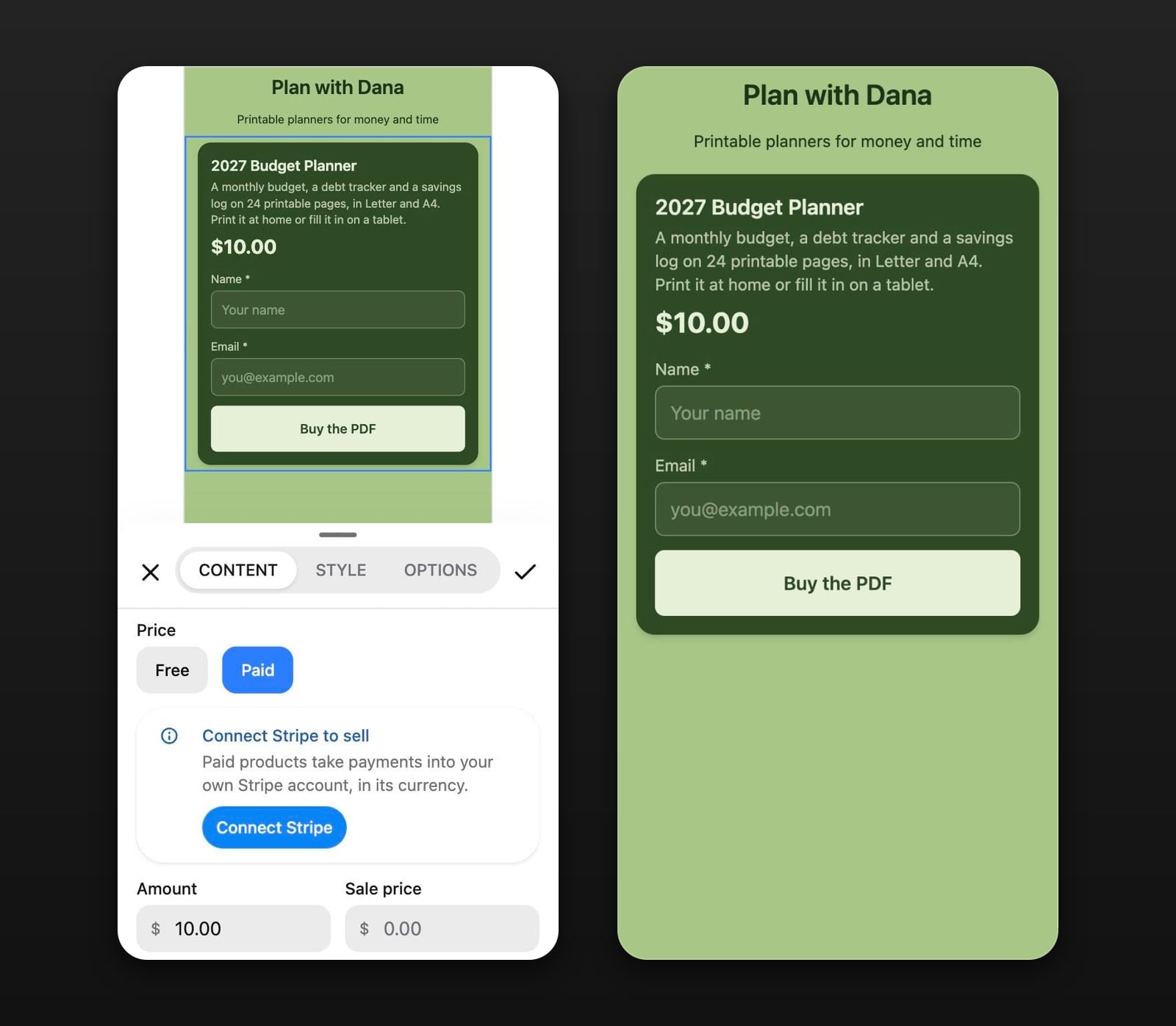
To see the delivery before anyone pays, set the sale price to 0, which makes the product free, and go through the block yourself. You'll see the receipt page and get the email as a buyer would, minus the payment. Then clear the sale price, and delete your test entry from your Audience.
The money goes to your own Stripe account, and Stick takes no percentage of it. Checkout charges the price you set without adding tax on top, and refunds and disputes are yours to handle in Stripe. Which Stick plan includes paid products is on the pricing page.
What the buyer gets#
After paying on Stripe's checkout page, the buyer lands on a receipt with a Download button, and Stick emails them a link back to that receipt. Each download link works for five minutes, and an order gets five downloads; after that, a code sent to the buyer's email unlocks five more. Refund a sale in full from Stripe and its download stops working.
Everyone who fills in the block lands in your Audience, including people who start checkout and don't finish. You can export the list as a CSV.
Can you stop people sharing the PDF?#
No, not on Stick or anywhere else that hands over an ordinary PDF. Once the file is on someone's laptop, they can forward it. What you control is the download link, and on Stick that link expires in five minutes and counts against the order's five downloads, so the link itself isn't worth passing around. The footer covers the copies that do travel: a forwarded file still says where it came from.
Selling a book rather than a worksheet? How to sell ebooks adds Amazon and the PDF-or-EPUB question. If you lay the PDF out in Canva, its license has rules about which elements can go into a file you sell: see how to sell Canva templates.