Canva's license lets you sell a template you designed, as long as the design is your own work. The rule that catches people out is about the format you deliver: a template that uses even one Canva Pro element can only go to buyers as a Canva template link.
Here is what the license allows, where to sell, what each place keeps from a sale, and how the buyer gets the template.
What Canva's license allows#
Canva's guide to selling designs made in Canva comes down to five rules:
- The design has to be original. You can't resell Canva content on its own. A stock photo with a border, an element you only recolored or resized, or a single graphic on an otherwise empty page all count as standalone use.
- Free and Pro elements can be mixed in a template you sell.
- Pro elements mean a template link. A template with any Pro content can only be sold as a Canva template link, never as a PDF or another file type, flattened or not.
- Free elements and your own photos mean either. A template built only from free content and material you own can be sold as a PDF or as a template link.
- No clipart or sticker packs. Selling Canva elements for use outside Canva, as clipart files or sheets of individual graphics, is not allowed. Clipart you sell has to be drawn from scratch.
| What the design contains | As a template link | As a PDF or image files |
|---|---|---|
| Free elements, your own photos and your own text | Yes | Yes |
| Any Pro element | Yes | No |
| Canva elements sold on their own | No | No |
Canva counts a design as a template when the buyer finishes it: a wedding invitation is one, because someone has to fill in the details. A finished ebook is not, even if it has pages to write in, and it follows its own rules, covered in how to sell ebooks.
That summary is of Canva's help guide as it read on 28 October 2026. The binding text is the Content License Agreement, and Canva updates both.
Make the template link#
Creating a template link takes a Canva Pro, Teams, Enterprise, Education or Nonprofits account. On Canva Free you can still design and sell a template built from free elements, as a PDF.
- Open the design and select Share.
- Choose Template link. If it isn't listed, it's under See all.
- Select Create template link, then Copy.
Open the link from another account before you sell it. Whoever opens it gets a copy of their own to edit, and your original stays as it is. Buyers need a Canva account, and a free one is enough to open it, but premium elements carry a watermark for Canva Free users until they buy those elements or upgrade (Canva on watermarks). Either say in your description that the template needs Canva Pro, or build it from free elements so it works for everyone.
Deleting a template link switches its address off, and a new link gets a new address. That is the only lever you have if a link starts circulating, because anyone who has it can use it, wherever you sold it.
Where to sell Canva templates#
On Etsy#
Etsy brings its own shoppers, which is what its fees pay for. A seller based in the US pays a $0.20 listing fee, a 6.5% transaction fee and 3% + $0.25 in payment processing on each sale (Etsy fees, payment processing). When one of Etsy's Offsite Ads brought the buyer, another 15% applies, or 12% for shops past $10,000 in sales over the past year.
An Etsy digital listing delivers files you upload, up to five of them at 20 MB each (Etsy digital listings). So template sellers upload a one-page PDF with the template link and instructions on it.
On a store like Gumroad#
Gumroad takes 10% + $0.50 of each sale made through your profile or a direct link, plus card processing of 2.9% + $0.30. When its Discover marketplace made the sale, it takes a flat 30% instead (Gumroad fees). In return Gumroad is the merchant of record and handles sales tax and VAT for you (Gumroad pricing).
On your own page#
A checkout on your own page costs card processing and nothing more per sale, and the buyer's email address is yours. What it doesn't do is find buyers: they come from your profile, your posts and your list. Stan Store sells this way, charging a monthly subscription rather than a cut. Our Stan Store explainer has its prices, and Stick vs Stan Store puts the two side by side. On Stick it is a Digital Product block, set up below.
Here is what a $12 template leaves you, for a US seller and a US card, before tax:
| Where it sells | Fees on $12 | You keep | Who finds the buyer |
|---|---|---|---|
| Etsy | $1.59, or $3.39 when an Offsite Ad made the sale | $10.41 | Etsy search, or you |
| Gumroad, through your link | $2.35 | $9.65 | You |
| Your own page, Stripe checkout | $0.65 | $11.35 | You |
Etsy's and Gumroad's fees were checked against their own pages on 28 October 2026. The Stripe row uses Stripe's standard US rate for domestic cards, 2.9% + $0.30, and the Stripe fee calculator works out any other price.
Price above the fixed fees#
Every route takes a fixed amount from each sale as well as a percentage: $0.45 on Etsy, $0.80 on Gumroad and $0.30 through Stripe. On a $3 template, fees come to $0.74 on Etsy, $1.19 on Gumroad and $0.39 through Stripe: a quarter, two fifths and an eighth of the price. A bundle of ten templates at a higher price loses a much smaller share of each sale to the fixed part.
Sell it from your Stick page#
- In the editor, add a Digital Product block. It's under Grow & Earn in the block menu.
- Upload a cover (a mockup of the template works well), then write a title and a description that says what's inside and whether it needs Canva Pro.
- Under Price, choose Paid and enter the amount. A Sale price is optional: checkout charges it whenever it's lower, and the page shows the original price crossed out.
- Under Reward after submit, choose Link and paste the template link, or choose File and upload a PDF with the link and your instructions.
- Connect Stripe once, in Settings → Payments. Prices show and charge in your Stripe account's currency, and a paid product won't publish until that account can take payments.
- Publish, and put the page in your bio.
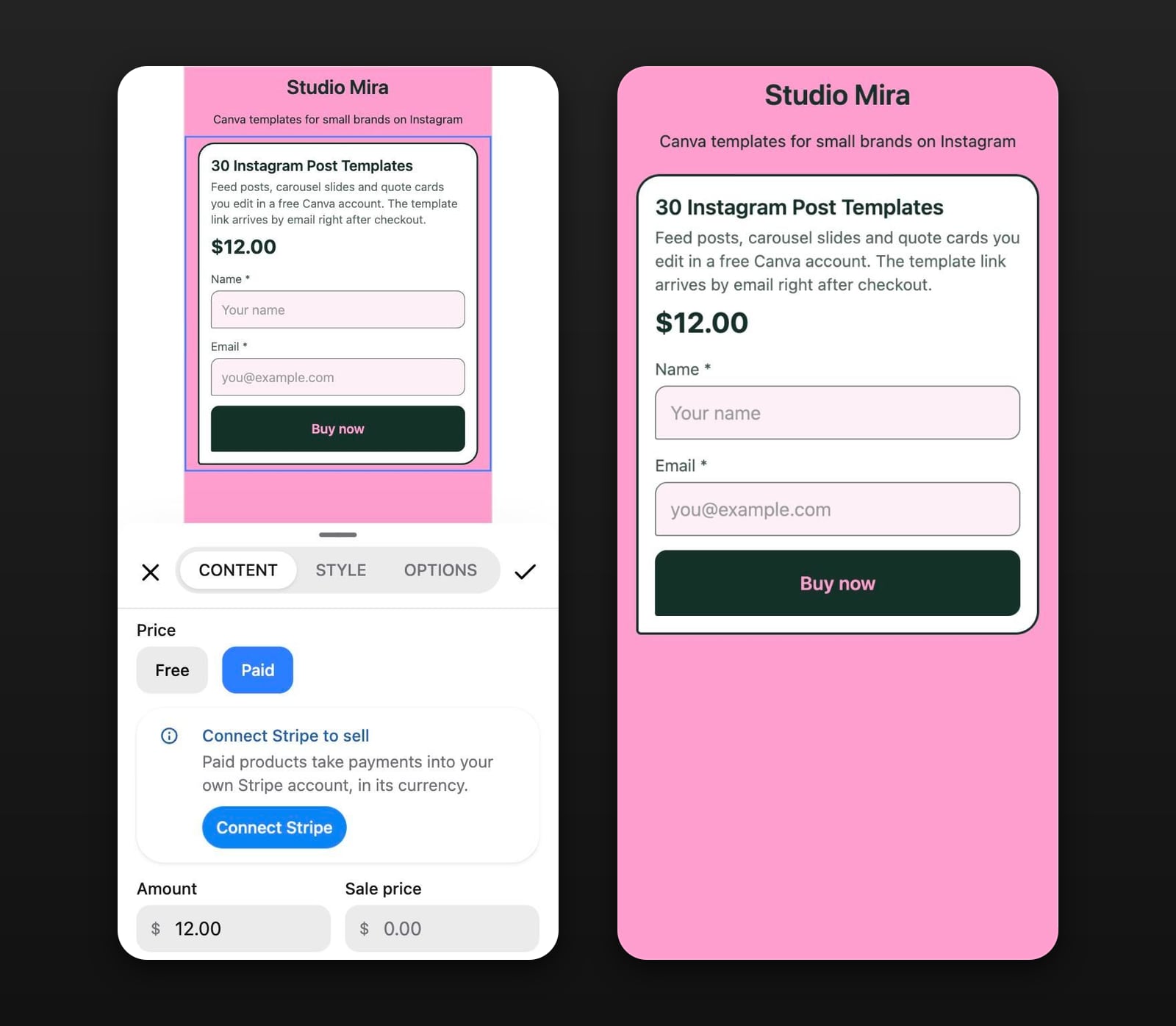
The template link never appears on the published page. A buyer types their name and email into the block, pays on Stripe's checkout page and lands on a receipt with an Open link button, and Stick emails them a link back to that receipt. You can rewrite that email in the block's Options tab.
The money goes to your own Stripe account, and Stick takes no percentage of it; Stripe's processing fee is the only deduction. You are the seller of record, so tax, refunds and disputes are yours to handle, and checkout charges the price you set without adding tax on top. Which Stick plan includes paid products is on the pricing page.
Everyone who fills in the block lands in your Audience, including people who start checkout and don't finish, and you can export it as a CSV. That list matters the day you replace a template link: past orders keep the link they paid for, so earlier buyers need the new one from you.
Notion templates sell the same way, as a link that copies into the buyer's workspace, under different rules: see how to sell Notion templates. If what you make is printable rather than editable, how to sell a PDF online covers the file side.