Linktree is a link in bio tool: it turns the one link a social profile gives you into a page that
holds all your others. You sign up, add your destinations, and you get an address like
linktr.ee/yourname to put in your Instagram, TikTok or X bio.
The link page is its starting point. Linktree has since added email sign-ups, contact forms, an Instagram auto-reply tool and digital-product sales, and all of them hang off that page. Here is how it works and what people use it for.
How Linktree works#
Your Linktree is one page at linktr.ee/ followed by your username. Putting it together takes four
steps:
- Add links. In the Links tab, select + Add, paste a URL and give it a title, which becomes the text on the button. Instead of a plain URL you can add a Link App, which lets visitors watch, listen or buy without leaving your page.
- Pick a look. The Design tab starts from a theme, which you can then adjust. More on that below.
- Share the address. Paste
linktr.ee/yournamewherever a profile asks for a website, or download the QR code Linktree makes for the page. - Watch what gets tapped. Insights counts views, clicks, click rate and subscribers. How far back it goes depends on the plan: 28 days on Free.
Changes show up on the page as soon as you make them, so the address in your bio never has to change. That is most of the point: you update one page instead of every profile. Linktree's own overview and guide to adding links cover the same steps.
What people use it for#
- One link for everything. A shop, a YouTube channel, a booking page, a newsletter and other socials, behind the single link a profile allows.
- Collecting contacts. A Subscribe button and contact forms collect emails and messages on any plan; sending them on to an email tool takes Pro.
- Instagram replies. An auto-reply tool sends a link by DM when someone comments, up to 1,000 times a month on Free.
- Selling. Free digital products, courses and bookings work on any plan. Charging for them takes Pro or Premium in supported countries, and Linktree Shops pays US users commission on partner brands' products.
How the design editor works#
Linktree groups its design controls into themes, header, wallpaper, text, buttons and colors. Choose a customizable theme if you want to adjust those settings. With a curated theme, Linktree's guide says only the wallpaper can be edited. An uploaded image or video background and the larger Hero header require Pro or Premium.
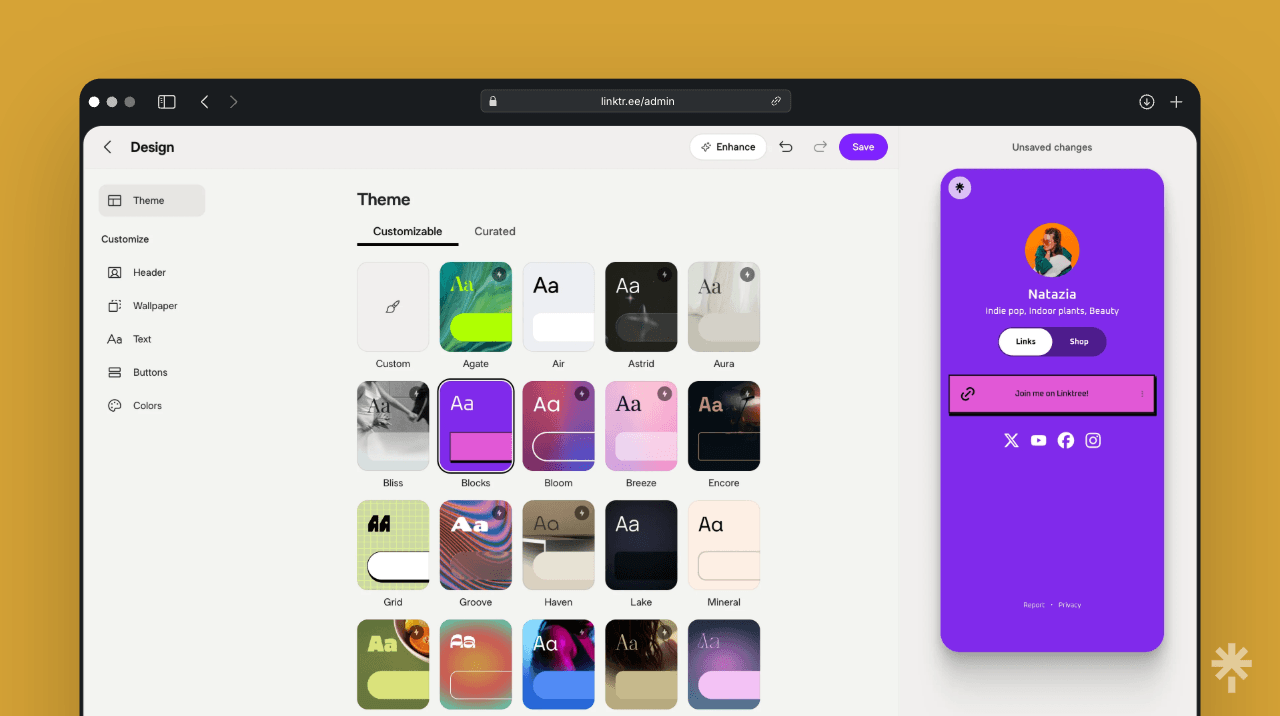
Image and instructions: Linktree's theme guide. Our Stick vs Linktree comparison shows the mobile editors in both tools, the theme picker in our Linktree Free account and the differences that matter when choosing a builder.
Free and paid, in short#
Linktree has a free plan, and for a page of links it is a usable one. Paying starts at $7 a month
billed annually. Starter turns off the ads Linktree is testing on some Free pages and adds insights
for each link; Pro removes the Linktree logo and lets you charge for products; Premium adds lifetime
analytics and team tools. No plan puts the page on a domain you own: Linktree's
custom-domain article says every
page stays at linktr.ee/yourname.
Every plan's price, what Free holds back and when it is enough are in Is Linktree free?, checked against Linktree's pricing page on 28 October 2026.
Who it suits#
Linktree suits you if you want the option everyone recognises. It is the default in this category for good reasons: it has a broad integration marketplace, it has been running for years, and your audience has seen the layout a hundred times, which means they know what to do with it.
The design decision is more specific than whether you can change a color. Free has useful style controls; Pro adds image and video backgrounds, expanded headers and logo removal. Decide whether those upgrades solve a need on your page, or whether you want a builder with different controls for arranging and styling individual blocks.
The alternatives, briefly#
There are a lot, and they split by job rather than by quality. Beacons is a creator suite with a store attached. Stan Store is a storefront that starts at $29 a month and no free plan. Carrd builds cheap one-page sites from $9 a year. Bento, which used to be the good-looking one, is gone — Linktree bought it and shut it down in February 2026, roughly two years after closing Koji in January 2024. Lnk.Bio does long lists of links plainly.
If you want it side by side rather than in a paragraph, we keep a comparison on the tools page and, if you have already decided to leave, the best Linktree alternatives, with what each one actually fixes. For the two-product decision, see Stick vs Linktree: free design, forms and plan limits.